const { useState, useEffect } = React;

const TWEAK_DEFAULTS = /*EDITMODE-BEGIN*/{
  "showcaseStyle": "fleet"
}/*EDITMODE-END*/;

// ============ Reusable icons (matching homepage style) ============
const Icon = {
  Arrow: (p) => (
    <svg viewBox="0 0 24 24" fill="none" {...p}>
      <path d="M5 12 H19 M13 6 L19 12 L13 18" stroke="currentColor" strokeWidth="1.8" strokeLinecap="square" strokeLinejoin="miter"/>
    </svg>
  ),
  Menu: (p) => (
    <svg viewBox="0 0 24 24" fill="none" {...p}>
      <line x1="4" y1="6" x2="20" y2="6" stroke="currentColor" strokeWidth="1.8"/>
      <line x1="4" y1="12" x2="20" y2="12" stroke="currentColor" strokeWidth="1.8"/>
      <line x1="4" y1="18" x2="20" y2="18" stroke="currentColor" strokeWidth="1.8"/>
    </svg>
  ),
  Pin: (p) => (
    <svg viewBox="0 0 24 24" fill="none" {...p}>
      <path d="M12 2 C8 2 5 5 5 9 C5 14 12 22 12 22 C12 22 19 14 19 9 C19 5 16 2 12 2 Z" stroke="currentColor" strokeWidth="1.6"/>
      <circle cx="12" cy="9" r="2.5" fill="currentColor"/>
    </svg>
  ),
  Clock: (p) => (
    <svg viewBox="0 0 24 24" fill="none" {...p}>
      <circle cx="12" cy="12" r="9" stroke="currentColor" strokeWidth="1.6"/>
      <path d="M12 7 V12 L15 14" stroke="currentColor" strokeWidth="1.8" strokeLinecap="round"/>
    </svg>
  ),
  Cloud: (p) => (
    <svg viewBox="0 0 24 24" fill="none" {...p}>
      <path d="M7 17 C4 17 3 15 3 13 C3 11 4.5 9 7 9 C7.5 6.5 9.5 5 12 5 C15 5 17 7 17.5 9.5 C20 9.5 21 11 21 13 C21 15 19.5 17 17 17 Z" stroke="currentColor" strokeWidth="1.6"/>
      <path d="M9 13 L12 16 L15 13" stroke="currentColor" strokeWidth="1.8" strokeLinecap="square" strokeLinejoin="miter"/>
      <line x1="12" y1="10" x2="12" y2="15" stroke="currentColor" strokeWidth="1.8"/>
    </svg>
  ),
  AlertEye: (p) => (
    <svg viewBox="0 0 48 48" fill="none" {...p}>
      <path d="M4 24 C8 14 15 8 24 8 C33 8 40 14 44 24 C40 34 33 40 24 40 C15 40 8 34 4 24 Z" stroke="currentColor" strokeWidth="2"/>
      <circle cx="24" cy="24" r="6" stroke="currentColor" strokeWidth="2"/>
      <line x1="6" y1="6" x2="42" y2="42" stroke="currentColor" strokeWidth="2.5"/>
    </svg>
  ),
};

// Cast Camera glyph — used inside iPhone screens
const CastCameraGlyph = ({ recording = false, name, time, geo, status }) => (
  <svg viewBox="0 0 200 360" className="phone__screen-svg">
    {/* status bar */}
    <rect x="0" y="0" width="200" height="20" fill="#000"/>
    <text x="14" y="14" fill="#fff" fontSize="9" fontFamily="JetBrains Mono">{time}</text>
    <text x="186" y="14" fill="#fff" fontSize="9" fontFamily="JetBrains Mono" textAnchor="end">100%</text>

    {/* viewfinder gradient */}
    <defs>
      <linearGradient id={`vf-${name}`} x1="0" x2="0" y1="0" y2="1">
        <stop offset="0" stopColor="#3a4a5e"/>
        <stop offset="1" stopColor="#0e1115"/>
      </linearGradient>
      <linearGradient id={`vf2-${name}`} x1="0" x2="1" y1="0" y2="1">
        <stop offset="0" stopColor="#5a6878" stopOpacity="0.5"/>
        <stop offset="1" stopColor="#0e1115" stopOpacity="0"/>
      </linearGradient>
    </defs>
    <rect x="0" y="20" width="200" height="340" fill={`url(#vf-${name})`}/>
    <rect x="0" y="20" width="200" height="340" fill={`url(#vf2-${name})`}/>

    {/* subject silhouette */}
    <ellipse cx="100" cy="170" rx="38" ry="48" fill="rgba(0,0,0,0.45)"/>
    <rect x="60" y="210" width="80" height="90" fill="rgba(0,0,0,0.4)"/>

    {/* top HUD */}
    <rect x="10" y="32" width="80" height="20" fill="rgba(0,0,0,0.5)" rx="2"/>
    {recording && <circle cx="22" cy="42" r="4" fill="#FF4747"/>}
    <text x="32" y="46" fill="#fff" fontSize="9" fontFamily="JetBrains Mono">{recording ? 'REC' : 'IDLE'}</text>
    <text x="62" y="46" fill={recording ? '#FF4747' : 'rgba(255,255,255,0.7)'} fontSize="8" fontFamily="JetBrains Mono">{recording ? '00:42' : '—'}</text>

    {/* metadata pills */}
    <rect x="110" y="32" width="80" height="20" fill="rgba(0,0,0,0.5)" rx="2"/>
    <text x="115" y="46" fill="#7A9BC2" fontSize="9" fontFamily="JetBrains Mono">{name}</text>

    {/* corner crosshair */}
    <path d="M14 60 L14 70 L24 70" stroke="rgba(255,255,255,0.5)" strokeWidth="1" fill="none"/>
    <path d="M186 60 L186 70 L176 70" stroke="rgba(255,255,255,0.5)" strokeWidth="1" fill="none"/>

    {/* metadata strip bottom */}
    <rect x="10" y="240" width="180" height="50" fill="rgba(0,0,0,0.55)" rx="2"/>
    <text x="18" y="256" fill="rgba(255,255,255,0.55)" fontSize="7" fontFamily="JetBrains Mono">GEOTAG</text>
    <text x="18" y="268" fill="#fff" fontSize="9" fontFamily="JetBrains Mono">{geo}</text>
    <text x="18" y="282" fill="rgba(255,255,255,0.55)" fontSize="7" fontFamily="JetBrains Mono">UPLOAD</text>
    <text x="74" y="282" fill={status === 'queued' ? '#E5A152' : status === 'synced' ? '#5DCE8A' : '#7A9BC2'} fontSize="8" fontFamily="JetBrains Mono">
      {status === 'synced' ? '✓ SYNCED' : status === 'queued' ? '↑ QUEUED' : '↻ LIVE'}
    </text>

    {/* shutter ring */}
    <circle cx="100" cy="320" r="20" fill="none" stroke="rgba(255,255,255,0.7)" strokeWidth="2"/>
    <circle cx="100" cy="320" r="15" fill={recording ? '#FF4747' : '#fff'}/>
  </svg>
);

// iPhone bezel
function Phone({ tilt, name, time, geo, status, recording, scale = 1 }) {
  return (
    <div className="phone" style={{ transform: `rotate(${tilt}deg) scale(${scale})` }}>
      <div className="phone__notch"></div>
      <div className="phone__screen">
        <CastCameraGlyph name={name} time={time} geo={geo} status={status} recording={recording}/>
      </div>
      <div className="phone__btn phone__btn--side"></div>
      <div className="phone__btn phone__btn--vol1"></div>
      <div className="phone__btn phone__btn--vol2"></div>
    </div>
  );
}

// ============ NAV ============
function Nav({ scrolled }) {
  const [menuOpen, setMenuOpen] = useState(false);
  useEffect(() => {
    document.body.style.overflow = menuOpen ? 'hidden' : '';
    return () => { document.body.style.overflow = ''; };
  }, [menuOpen]);
  const closeMenu = () => setMenuOpen(false);
  const scrollTop = (e) => { e.preventDefault(); window.scrollTo({ top: 0, behavior: 'smooth' }); closeMenu(); };
  return (
    <header className={`nav ${scrolled ? 'nav--solid' : 'nav--floating'}`}>
      <div className="nav__inner">
        <a href="/" className="nav__logo" aria-label="Ages Productions home">
          <img src="assets/logo-primary.png" alt="Ages Productions"/>
        </a>
        <nav className="nav__links">
          <a href="/" className="nav__link">Home</a>
          <a href="Ages Productions Media Workflow.html" className="nav__link">Media Workflow</a>
          <a href="#" className="nav__link nav__link--active" onClick={(e) => { e.preventDefault(); window.scrollTo({ top: 0, behavior: 'smooth' }); }}>Self-Shoot Systems</a>
          <a href="Ages Productions About.html" className="nav__link">About</a>
          <a href="Ages Productions Use Cases.html" className="nav__link">Use Cases</a>
          <a href="Ages Productions Contact.html" className="nav__link">Contact</a>
        </nav>
        <div className="nav__cta"></div>
        <button className="nav__menu" aria-label={menuOpen ? "Close menu" : "Open menu"} aria-expanded={menuOpen} onClick={() => setMenuOpen(o => !o)}>
          {menuOpen
            ? <svg viewBox="0 0 24 24" width="22" height="22" fill="none"><line x1="6" y1="6" x2="18" y2="18" stroke="currentColor" strokeWidth="1.8"/><line x1="18" y1="6" x2="6" y2="18" stroke="currentColor" strokeWidth="1.8"/></svg>
            : <Icon.Menu width="22" height="22"/>}
        </button>
      </div>
      <div className={`nav__drawer ${menuOpen ? 'nav__drawer--open' : ''}`} aria-hidden={!menuOpen}>
        <div className="nav__drawer-inner">
            <a href="/" className="nav__drawer-link" onClick={closeMenu}>Home</a>
            <a href="Ages Productions Media Workflow.html" className="nav__drawer-link" onClick={closeMenu}>Media Workflow</a>
            <a href="#" className={`nav__drawer-link nav__drawer-link--active`} onClick={scrollTop}>Self-Shoot Systems</a>
            <a href="Ages Productions About.html" className="nav__drawer-link" onClick={closeMenu}>About</a>
            <a href="Ages Productions Use Cases.html" className="nav__drawer-link" onClick={closeMenu}>Use Cases</a>
            <a href="Ages Productions Contact.html" className="nav__drawer-link" onClick={closeMenu}>Contact</a>
        </div>
      </div>
    </header>
  );
}

// ============ HERO ============
const FLEET = [
  { name: "CAST-01", time: "14:22", geo: "34.099°N", status: "synced", tilt: -4, recording: true },
  { name: "CAST-02", time: "14:23", geo: "34.099°N", status: "live", tilt: 2, recording: true },
  { name: "CAST-03", time: "14:21", geo: "34.101°N", status: "queued", tilt: -2, recording: false },
  { name: "CAST-04", time: "14:24", geo: "34.098°N", status: "synced", tilt: 5, recording: true },
  { name: "CAST-05", time: "14:18", geo: "34.102°N", status: "synced", tilt: -3, recording: false },
  { name: "CAST-06", time: "14:25", geo: "34.099°N", status: "live", tilt: 3, recording: true },
];

function Hero({ showcaseStyle }) {
  return (
    <section className="hero">
      <div className="hero__bg" aria-hidden="true">
        <div className="hero__grid"></div>
      </div>

      <div className="hero__inner container">
        <div className="hero__copy">
          <div className="hero__eyebrow">
            <span className="dot"></span>
            <span>SELF-SHOOT SYSTEMS</span>
            <span className="hero__eyebrow-sub">Cast Camera · iPhone Workflow</span>
          </div>
          <h1 className="hero__title">
            Cast keeps shooting.<br/>
            <span className="hero__title-accent">Production keeps the receipts.</span>
          </h1>
          <p className="hero__lede">
            Cast Camera turns a fleet of iPhones into a tracked, automated capture system —
            every clip stamped with cast, time, location and upload state the moment it's recorded.
          </p>
          <div className="hero__cta">
            <a href="Ages Productions Contact.html" className="btn btn--primary">
              <span>Deploy Cast Camera</span>
              <Icon.Arrow width="18" height="18"/>
            </a>
            <a href="#how" className="btn btn--outline-light">
              <span>See how it works</span>
            </a>
          </div>
        </div>
      </div>

      <div className="hero__scroll">
        <span>SCROLL</span>
        <span className="hero__scroll-line"></span>
      </div>
    </section>
  );
}

// ============ PROBLEM ============
function Problem() {
  return (
    <section className="problem">
      <div className="container">
        <div className="problem__grid">
          <div className="problem__lead">
            <span className="section-label">[01]&nbsp;&nbsp;THE PROBLEM</span>
            <h2 className="h-display">
              Producers shoot. Cast shoots.<br/>
              <span className="text-blue">Nobody knows what was shot.</span>
            </h2>
          </div>
          <div className="problem__body">
            <p>
              Even with production-issued phones, self-shot footage tends to disappear into
              camera rolls, missed transfers, and "I think I sent that yesterday" Slack threads.
            </p>
            <p>
              By the time post realizes a moment is missing, the cast is asleep, the location
              has wrapped, and the iPhone is on a charger in someone's hotel room.
            </p>
            <div className="problem__pain">
              {[
                "Did anyone shoot today?",
                "Which phone has the diary cam?",
                "Where was that recorded?",
                "Was it uploaded?",
                "Is it still on the device?",
              ].map(q => (
                <div className="problem__pain-row" key={q}>
                  <Icon.AlertEye width="22" height="22"/>
                  <span>{q}</span>
                </div>
              ))}
            </div>
            <p className="problem__pull">
              Cast Camera answers all five questions before anyone has to ask.
            </p>
          </div>
        </div>
      </div>
    </section>
  );
}

// ============ CAST CAMERA DEEP DIVE ============
function CastCamera() {
  const fields = [
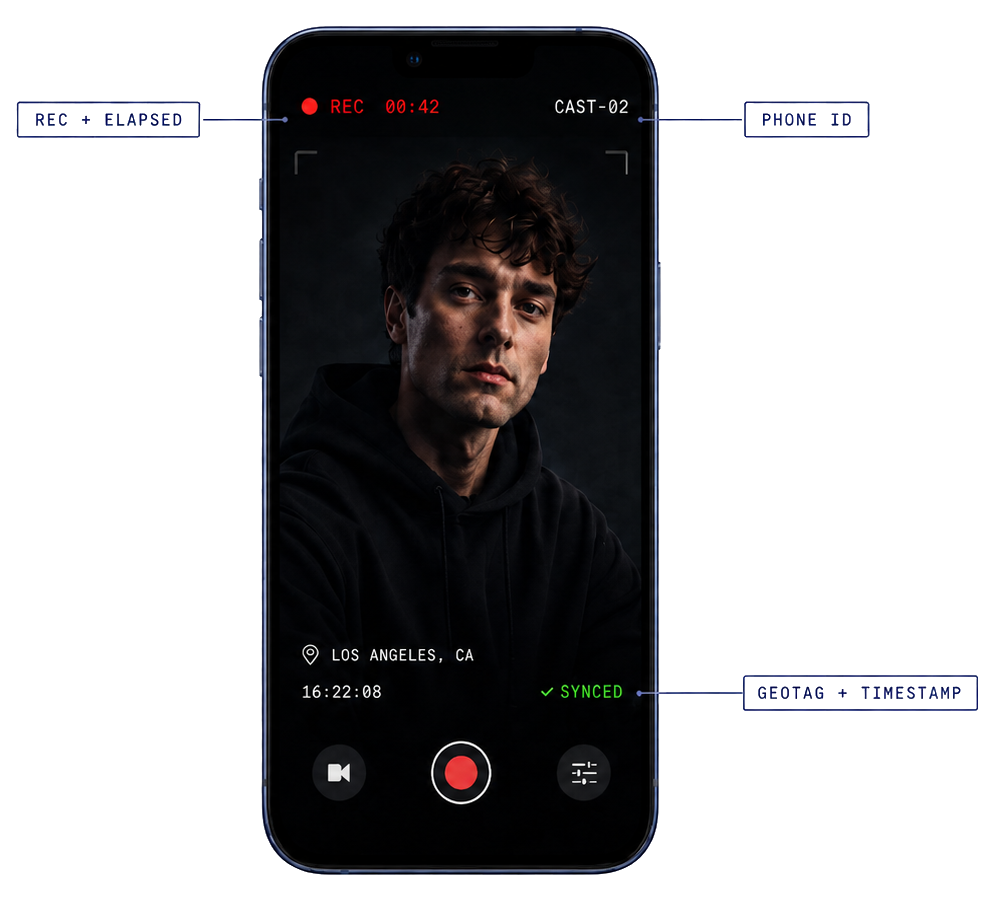
    { icon: Icon.Pin, label: "GEOTAG / LOCATION", desc: "Coordinates + named location captured at the moment of record. Filterable by city, day, or geofence — not by guesswork." },
    { icon: Icon.Clock, label: "DATE & TIME", desc: "Real-time stamp burned into metadata at start of clip. Sortable, queryable, and reconciled against the production schedule." },
    { icon: Icon.Cloud, label: "UPLOAD STATUS", desc: "Live state per clip: queued, in flight, synced, failed. Production sees the truth, not a promise." },
  ];
  return (
    <section className="castcam" id="cast-camera">
      <div className="container">
        <div className="castcam__head">
          <span className="section-label section-label--light">[02]&nbsp;&nbsp;CAST CAMERA</span>
          <h2 className="h-display">
            One app. Every clip<br/>
            <span className="text-blue-light">accounted for.</span>
          </h2>
          <p className="castcam__lede">
            A custom-built iPhone capture app, deployed across the cast fleet. Records to device,
            tags every file, and reports back to a production-side log automatically.
          </p>
        </div>

        <div className="castcam__layout">
          {/* Phone showcase — uploaded transparent image, annotations baked in */}
          <div className="castcam__phone">
            <img src="assets/castcam-original-image.png" alt="Cast Camera app — REC + elapsed, phone ID, geotag and timestamp" className="castcam__phone-img"/>
          </div>

          {/* Fields */}
          <div className="castcam__fields">
            {fields.map((f, i) => (
              <div className="field" key={i}>
                <div className="field__num">0{i+1}</div>
                <div className="field__icon"><f.icon width="28" height="28"/></div>
                <div className="field__body">
                  <div className="field__label">{f.label}</div>
                  <p>{f.desc}</p>
                </div>
              </div>
            ))}
          </div>
        </div>

        {/* metadata strip — what gets logged */}
        <div className="logstrip">
          <div className="logstrip__head">
            <span>// AUTO-LOGGED PER CLIP</span>
            <span>NO MANUAL ENTRY</span>
          </div>
          <div className="logstrip__row">
            {["Phone ID", "Cast Name", "Filename", "Date", "Time", "Geotag", "Upload State", "Saved to Roll", "Episode Tag"].map((t, i) => (
              <span className="logstrip__pill" key={i}>{t}</span>
            ))}
          </div>
        </div>
      </div>
    </section>
  );
}

// ============ HOW IT WORKS ============
function HowItWorks() {
  const steps = [
    {
      tag: "DEPLOY",
      title: "Phones arrive ready.",
      desc: "Each handset is provisioned, named, and assigned to a cast member before it ever leaves base. Cast Camera is locked open as the default capture surface.",
      meta: ["Provisioned", "MDM-managed", "Cast assigned"],
    },
    {
      tag: "RECORD",
      title: "Cast just hits record.",
      desc: "No menus, no naming conventions for talent to remember. The app handles file naming, geotag, timestamp, and cast attribution automatically.",
      meta: ["Auto-tagged", "Geo + time", "Save to roll"],
    },
    {
      tag: "UPLOAD",
      title: "Footage moves on its own.",
      desc: "Background sync over Wi-Fi or cellular. Clips queue, retry, and confirm without anyone opening the app. Production sees status per clip in real time.",
      meta: ["Background sync", "Resumable", "Live status"],
    },
    {
      tag: "LOG",
      title: "Production gets the truth.",
      desc: "Every clip lands in a production-side log with full metadata. Filter by cast, day, location, or upload state — and hand off cleanly to post.",
      meta: ["Production log", "Filterable", "Post-ready"],
    },
  ];
  return (
    <section className="how" id="how">
      <div className="container">
        <div className="how__head">
          <span className="section-label">[03]&nbsp;&nbsp;HOW IT WORKS</span>
          <h2 className="h-display">
            Four steps.<br/>
            <span className="text-blue">Zero questions at wrap.</span>
          </h2>
        </div>
        <div className="how__rail">
          {steps.map((s, i) => (
            <article className="howstep" key={i}>
              <div className="howstep__index">
                <span className="howstep__num">0{i+1}</span>
                <span className="howstep__tag">{s.tag}</span>
              </div>
              <h3 className="howstep__title">{s.title}</h3>
              <p className="howstep__desc">{s.desc}</p>
              <div className="howstep__meta">
                {s.meta.map(m => <span key={m} className="howstep__meta-pill">{m}</span>)}
              </div>
              <div className="howstep__progress" aria-hidden="true">
                <span className="howstep__progress-bar" style={{ width: `${(i+1)*25}%` }}></span>
              </div>
            </article>
          ))}
        </div>
      </div>
    </section>
  );
}

// ============ HARDWARE & SETUP ============
function Hardware() {
  const cards = [
    {
      label: "POWER",
      title: "Charging plan that survives a 14-hour day.",
      desc: "Per-cast charging schedule and battery packs issued for producer phones and travel days. No phone dies mid-confessional.",
      stat: { v: "14h", l: "FIELD RUNTIME" },
    },
    {
      label: "CONNECTIVITY",
      title: "SIM strategy built for travel.",
      desc: "Dual-SIM provisioning where it helps, eSIM where it doesn't. International data planning ahead of cross-country and cross-border shoots.",
      stat: { v: "Dual", l: "SIM / eSIM" },
    },
    {
      label: "STORAGE",
      title: "Storage planned per cast, per day.",
      desc: "Daily clip volume modeled per cast member with retention rules. Local storage clears after the production shoot wraps — never before.",
      stat: { v: "After Wrap", l: "STORAGE CLEARS" },
    },
  ];
  return (
    <section className="hardware">
      <div className="container">
        <div className="hardware__head">
          <span className="section-label">[04]&nbsp;&nbsp;HARDWARE & SETUP</span>
          <h2 className="h-display">
            Software is half the system.<br/>
            <span className="text-blue">The kit matters too.</span>
          </h2>
        </div>
        <div className="hardware__grid">
          {cards.map((c, i) => (
            <article className="hwcard" key={i}>
              <div className="hwcard__label">{c.label}</div>
              <h3 className="hwcard__title">{c.title}</h3>
              <p className="hwcard__desc">{c.desc}</p>
              <div className="hwcard__stat">
                <div className="hwcard__stat-v">{c.stat.v}</div>
                <div className="hwcard__stat-l">{c.stat.l}</div>
              </div>
            </article>
          ))}
        </div>
      </div>
    </section>
  );
}

// ============ FINAL CTA ============
function FinalCTA() {
  return (
    <section className="cta">
      <div className="cta__bg" aria-hidden="true"></div>
      <div className="container cta__inner">
        <span className="section-label">NEXT STEP</span>
        <h2 className="cta__title">
          Bring Cast Camera<br/>to your next production.
        </h2>
        <p className="cta__lede">
          Whether you're rolling out one diary cam or a cast-wide fleet, Ages Productions can
          provision the phones, deploy the app, and stand up the upload pipeline before day one.
        </p>
        <div className="cta__buttons">
          <a href="Ages Productions Contact.html" className="btn btn--primary btn--lg">
            <span>Plan a Cast Camera Rollout</span>
            <Icon.Arrow width="20" height="20"/>
          </a>
        </div>
      </div>
    </section>
  );
}

// ============ FOOTER ============
function Footer() {
  return (
    <footer className="footer">
      <div className="container footer__inner">
        <div className="footer__brand">
          <img src="assets/logo-primary.png" alt="Ages Productions" className="footer__logo"/>
          <p className="footer__tag">Field-to-post media workflow management for high-volume Reality TV productions.</p>
        </div>
        <div className="footer__cols">
          <div>
            <h6>SERVICES</h6>
            <a href="Ages Productions Media Workflow.html">Media Workflow</a>
            <a href="#" onClick={(e) => { e.preventDefault(); window.scrollTo({ top: 0, behavior: 'smooth' }); }}>Self-Shoot Systems</a>
            <a href="Ages Productions Media Workflow.html#remote-cloud">Remote Delivery</a>
          </div>
          <div>
            <h6>COMPANY</h6>
            <a href="Ages Productions About.html">About</a>
            <a href="Ages Productions Use Cases.html">Use Cases</a>
            <a href="Ages Productions Contact.html">Contact</a>
          </div>
          <div>
            <h6>CONTACT</h6>
            <a href="Ages Productions Contact.html">Build a Media Plan</a>
            <span className="footer__loc">Miami · Worldwide</span>
          </div>
        </div>
      </div>
      <div className="footer__bar">
        <span>© 2026 Ages Productions. All rights reserved.</span>
        <span>v1.0 · Field → Post</span>
      </div>
    </footer>
  );
}

// ============ APP ============
function App() {
  const [t, setTweak] = window.useTweaks(TWEAK_DEFAULTS);
  const [scrolled, setScrolled] = useState(false);

  useEffect(() => {
    const onScroll = () => setScrolled(window.scrollY > 40);
    window.addEventListener('scroll', onScroll);
    onScroll();
    return () => window.removeEventListener('scroll', onScroll);
  }, []);

  return (
    <div className="app accent-balanced">
      <Nav scrolled={scrolled}/>
      <Hero showcaseStyle={t.showcaseStyle}/>
      <Problem/>
      <CastCamera/>
      <HowItWorks/>
      <Hardware/>
      <FinalCTA/>
      <Footer/>

      <window.TweaksPanel title="Tweaks">
        <window.TweakSection title="iPhone showcase">
          <window.TweakRadio
            label="Hero treatment"
            value={t.showcaseStyle}
            options={[
              { value: 'fleet', label: 'Fleet' },
              { value: 'single', label: 'Single' },
              { value: 'closeup', label: 'Close-up' },
            ]}
            onChange={v => setTweak('showcaseStyle', v)}
          />
        </window.TweakSection>

      </window.TweaksPanel>
    </div>
  );
}

const root = ReactDOM.createRoot(document.getElementById('root'));
root.render(<App/>);